⌕
Deep local analysis
Inspect resolution, exact dimensions, codecs, HDR signaling, duration, bitrate, embedded subtitles, and every scanned audio track. Technical filename checks compare recognized tags with the file itself.
 MediaNamer
Bring order to your movies, TV shows, and other files. Inspect media, build consistent filenames, review matches, and copy or move files into your library—with clear previews and explicit approval before changes.
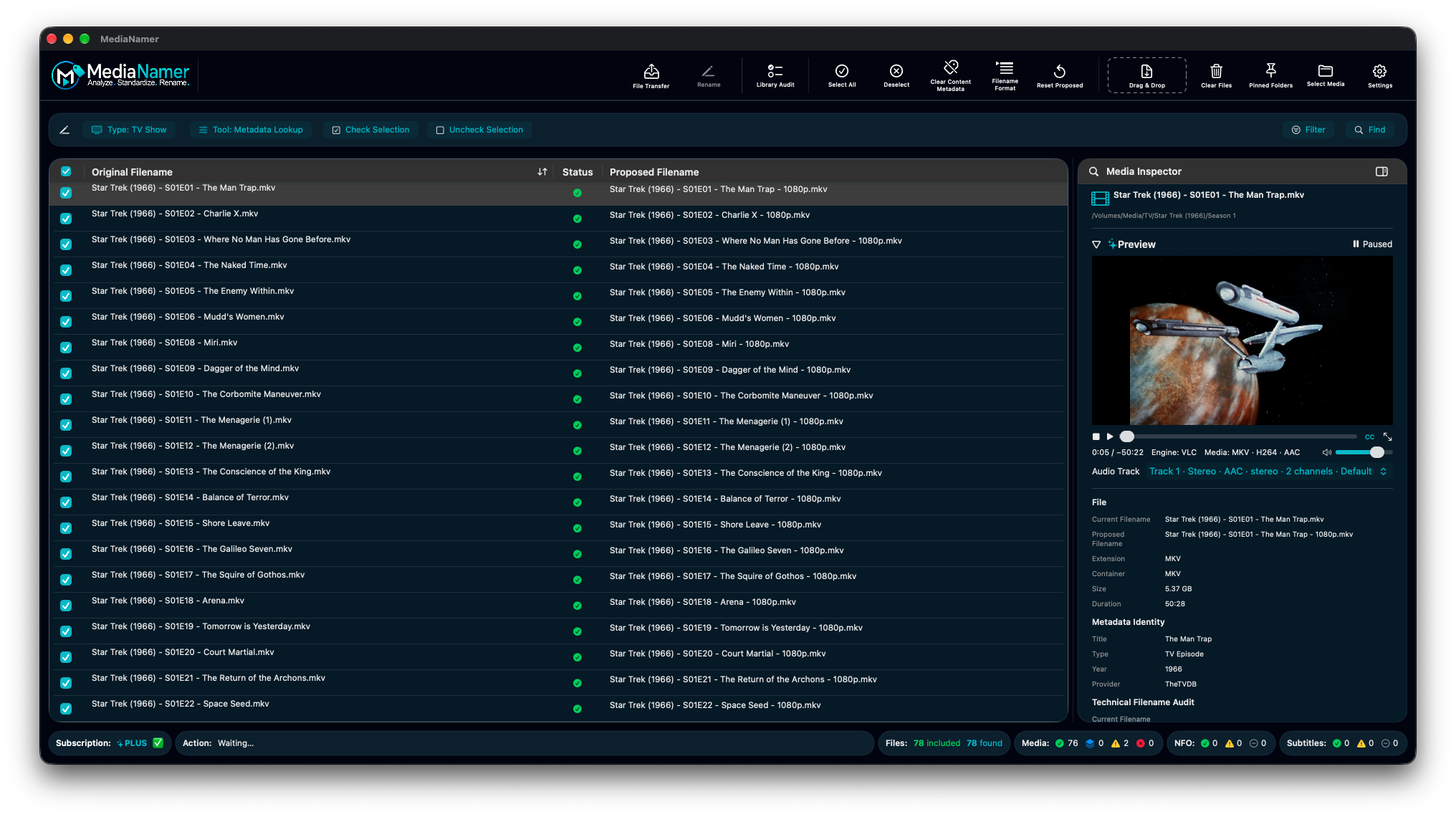
From individual corrections to a complete library workflow, keep the original filename, proposed result, and file status in view. Choose Movie, TV Show, or Other, then work on the files you explicitly check.
Inspect resolution, exact dimensions, codecs, HDR signaling, duration, bitrate, embedded subtitles, and every scanned audio track. Technical filename checks compare recognized tags with the file itself.
Prepend, append, insert, or remove characters; replace the first, last, or every occurrence of text. Edit individual proposals directly, including valid non-media filenames.
Arrange filename fields, choose separators, and save reusable profiles. Local formatting can retain the original name and add scanned technical details. Plus adds matched movie and episode fields.
Check individual files, inspect readiness explanations, and review proposed names before Rename. Invalid names and destination collisions block execution; session Rename History supports eligible Undo operations.
Drag in files or folders, optionally scan subfolders, append or replace your working set, then find, filter, and inspect. Quick Look, Finder actions, keyboard controls, Light and Dark appearance, adjustable text, and contextual Help keep work accessible.
Basic File Transfer supports direct or preserved-folder layouts, explicit companion selection, and destination checks. Queue jobs, follow stage and overall progress, and review recorded outcomes and recovery details.
Six additional and enhanced features in the current development version. MediaNamer is coming soon; public availability and subscription details will be announced at launch.
Find movies, TV movies, and mini-series by title or exact identifier. Review uncertain results, correct a single match, or retry failed searches before applying proposed filenames.
Search by series title or exact Series ID. Work with Aired, DVD, or Absolute order, assign episodes manually or sequentially, include Specials, and name files containing multiple episodes.
Combine matched titles, years, content ratings, season and episode details, and local technical facts. Customize field order and separators, retain original names when useful, and reuse saved profiles.
Play media inside the Inspector with seeking, Stop, Play/Pause, volume, mute, embedded audio-track and subtitle selection, and full-screen playback. Preview is read-only and starts only when you choose Play.
Build destination folders with Movie, TV Show, or Source Filename presets, editable folder templates, and reusable Transfer Profiles. Review planned paths before confirming a copy or move.
Audit the current workspace or another library location for filename, technical-detail, and companion-file issues. Compare folder paths with a chosen preset, export the report, and bring selected findings into the File Table for correction.
Explore the controls behind matching, transfers, and cleanup.
Movie searches support title and year, exact TMDB movie IDs, or IMDb IDs. TV searches support titles or exact TheTVDB Series IDs. Ambiguous matches remain available for review; failed searches are distinguished from no results.
For TV batches, Manual Selection lets you choose only the rows you want, Skip File or Undo Skip, and review duplicate episode candidates. Multi-Episode Selection combines distinct episodes from one season into one filename. Sequential Order pairs files in order. Updating proposals does not rename files on disk.
Review associations for existing external subtitles and NFO files, resolve ambiguous matches, and explicitly select companions for transfer. Paired IDX/SUB subtitles require both files. MediaNamer does not generate NFO files; the embedded preview player uses embedded subtitles rather than loading external subtitle companions.
Check Destination evaluates the selected location and automatically chooses a compatible transfer method. Existing files are protected unless you explicitly select overwrite and confirm it. Transfer verification and per-file outcomes make completed, failed, and uncertain work visible.
Confirmed jobs can continue while their transfer screen is closed, as long as MediaNamer remains open. Waiting jobs can be reordered, paused, or cancelled; active work pauses at safe checkpoints. Transfer History and saved reports retain outcomes and recovery paths. Interrupted jobs do not automatically resume or delete uncertain files after restart.
In v0.33, missing folder-template values point you toward the selected Folder Preset or Transfer Profile first—for example, a TV template applied to movies. Metadata Lookup is needed only when the correct template still lacks required identity details.
Inspect checked files before removing supported embedded descriptive tags, chapters, and cover artwork. MediaNamer retains file attribute metadata and verifies media streams before replacement where a rewrite is needed; it does not re-encode media to clear tags.
Run clearing separately or opt into clearing the verified destination during transfer. Copy originals stay unchanged. Clearing requires explicit confirmation and cannot be undone. Review errors in History and use Retry Failed Files for a fresh inspection and confirmation.
Library Audit is read-only. Filter findings, compare folder placement with a preset, and export a complete report. Missing or uncertain identity is marked for review or left ungraded rather than treated as a confirmed defect.
Review Selected in File Table brings findings into the existing correction workflow. Metadata Lookup, filename edits, Rename, and Transfer remain separate actions. Run a new audit afterward to verify the final library location.
Technical analysis and manual naming work locally. Online lookup requests the identity information needed for matching—such as title, year, season, episode, or provider ID—without uploading your media. Technical metadata inspection and All Audio Tracks remain available without Plus.
MediaNamer focuses on naming, inspection, and organization. It is not a transcoder, media server, backup system, or automatic repair tool. Previewing part of a file does not certify the whole file.
Bring in the files or folders that need attention.
Read local media facts and review optional identity matches.
Use manual tools or a filename profile built around your library.
Review every proposed filename.
Confirm validated changes and review session history.
Copy or move to a checked destination, then audit with Plus.
MediaNamer is a native macOS application designed around local, reliable media-library workflows.
Join the MediaNamer mailing list for updates, announcements, and early access news.